scientific and technical website design projects news

CookandKaye News

Chemistry Map of Scotland

Chemistry Map Of Scotland

The Chemistry Map of Scotland was built for the Royal Society of Chemistry as part of their International Year of Chemistry celebration (2011). It was presented at the Science and the Parliament meeting in Edinburgh on Wednesday 9 November 2011 (our previous blog post).

The purpose of the site is to encourage school children to explore the chemistry by looking at how it impacts their local area. I had thought it would be mostly a historic project, but the children’s submissions show that it is anything but – they see chemistry as very much a part of a living and working landscape; the local galvanising works, offshore wind-farms and whiskey distilleries are at least as important as the work of Joseph Black (1728 – 1799)!

The site design is very simple, you won’t get lost anywhere here! We are particularly proud of the logo – even if it does conflate a couple of stereotypes – the thistle (for Scotland) and the benzene ring (for chemistry). The logo was designed to inject a bit of fun and movement into the site, along with the defiantly off-square page corners! In discussion with the client we selected the ‘Short Stack’ font by James Grieshaber, one of the free Google Web Fonts. The font is quirky, friendly without being MS Comic Sans, which has been rather over-exposed.

At the start of the project it was evident that Google were bringing in new charging policies for the use of mapping, so we chose to look at the Open Source alternative. The mapping program we used is OpenLayers, while the base mapping is provided by OpenStreetMap. OpenLayers can use any base mapping (for example Google, Bing or the Ordnance Survey) or satellite/aerial photography layers (Google and Bing are the most commonly seen examples on the web). This choice provides a great deal of flexibility to the project, as mapping sources can be changed as need or expediency dictate.

The public site provides an interactive map with clickable icons leading to students essays (stored in PDF format, to simplify administration). It also has a smart search facility, automatically checking date ranges for articles if a number is input (again my preconception that most of the content would be historic – but it is nice to see what chemistry was going on in Scotland in the year 1850). When search results are displayed they automatically update the thumbnail map, so it centres on the relevant place as your cursor hovers over each result.

We re-visit the Cookies debate with this site. Cookies enable us to create bookmarks to previously viewed pages for you, making it easy to jump between different essays on the same subject (or whatever you like!). Here we looked at an explicit permission system, as required by European Law – you have to click before we can create a cookie. This is the most satisfactory (and legally correct) way of dealing with this problem, which we have previously addressed. Mixed messages are coming from government though, so despite the fact that there is a lot of good in this law for the e-proles, it seems increasingly unlikely that the UK will ever enforce it.

Finally, the site is driven by a custom administration interface, permitting the RSC to add and edit points on the map. Hopefully this will ensure that the site can be kept going and expanding for a long time to come…

Visit the Chemistry Map of Scotland

Science and the Parliament

Science and the parliament 2012.

It has been a busy week here, with a visit to the Royal Society of Chemistry’s (RSC) ‘Science and the Parliament’ meeting in Edinburgh. Here our latest project, the ‘Chemistry Map of Scotland’ was launched by Prof. David Phillips (OBE), President of the Royal Society of Chemistry.

The project allows local schoolchildren to put chemistry on the map, and was created for the Scottish branch of the RSC as part of the celebration of the International Year of Chemistry (2011). The site is also, in part, a memorial to an old friend of mine, Dr Nigel Botting of St Andrews University.

The launch meeting itself, while sponsored by the RSC, is intended to raise the profile of science more generally in parliament, and there were a number of august speakers, including Scottish Parliamentarians at the event.

The short of the story from the meeting is that the Scottish higher education system performs very strongly in pure research metrics, but this does not benefit the economy – at least out-with the very important higher education sector! My feeling was that the meeting lacked the weight that a leading industrialist or entrepreneur might have provided on the main panel, but was none-the-less quite thought provoking.

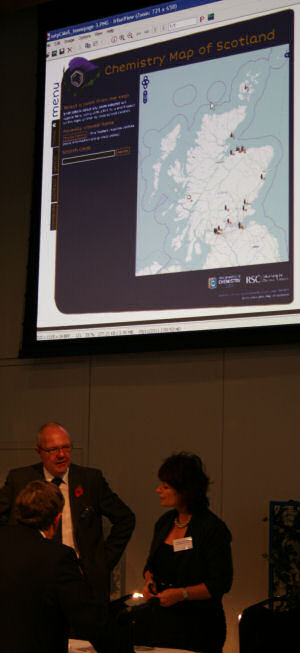
Above right: Photo taken at the Chemistry and the Parliament meeting immediately after the main panel discussion, with a screen-shot from the Chemistry Map of Scotland in the background.

SMARTdiving

We’re currently working on a website for the Sound of Mull Artificial Reef Trust – a new project to establish an artificial reef in the Sound of Mull. The aim of this multi-million pound project is to sink a decommissioned Royal Naval destroyer in the Sound to act as a tourist attraction for the whole region.

As well as providing an economic boost to an area, artificial reefs have a pretty good environmental record, so we’re pleased to be involved! The main site is being held back whilst negotiations proceed, but you can register your interest in the project now through the link below:

SMARTdiving, the Sound of Mull Artificial Reef Project

Wrong demographic?

Small logos for twitter post - wrong demographic.Social media are the in thing – within a certain sector of the population. In planning your social media campaign it is important to work out what your market is using, as this might be quite different from the social-networking tools that you employ. For example, we run a twitter feed for one of our academic clients, that has a high take up amongst both existing and (more importantly) potential students, but no significant penetration in the staff cadre. It is potentially very useful, but not too easy to sell (see Nanofolio‘s twitter feed).

A big question for commercial sites is does having an active social media presence boost your site presence on the search engines? – The jury is still out on this. It certainly does not offer incremental improvement, but Google at least is aware of social media activity associated with your site, and does count links from Tweets to your pages – whether or not it gives them much credence is another matter! The latest upgrade to Twitter, however, allows you to add a photo to your Tweet, and makes this an attractive shop window for products in its own right (see Mobility Nationwide‘s Twitter feed)…

A big use of Twitter for many years has been the conference circuit; creating a Twitter #tag for your conference allows delegates to provide feedback in real time, and contributes to both academic debate and networking amongst delegates. At least it should, as Chad Orzel comments on his blog (the post that spurred me into writing this!):

Social Media Are Not Evenly Distributed

Cookie crumbs (part 2)

We’ve just started work on a multi-lingual site, where the entire site is duplicated in English and French (rather than just a summary in the ‘non-target’ language). This has a basic requirement to offer pages in either language with a seemless transition if required, and one of the simplest ways for doing this is to ask the visitor what language they want to read the site in, and then remember their answer. It is the remembering part where we run into trouble; because the visitor is only identified by their IP address, which can change, we ask to save a token on the visitor’s machine called a cookie. When they ask for a page from our site they also present this cookie, which we can use this to make a connection between them and and data we have stored about them – in this case what language they want their page in!

Informer : c’est obligatoire ! [CNIL]

In May we posted The cookie crumbles, so we thought it worth while re-visiting the question in advance of our new contract to see what has changed. Most of Europe has yet to implement the directive, but the French CNIL has moved to post clear requirements for website owners (OK they look to be clear with my understanding of French and the use of Google Translate!). In contrast the UK’s position is quite muddy; in attempting to protect the online advertising industry the government seems to have left ICO in a cleft stick, with the requirement to implement without changing anything.

ICO have had a bit of a go on their own website, as you can see from the banner image below (captured from their site August 25 2011):

ICO's banner (August 2011) showing Cookie notification script

The ICO’s website informs you that they’ve already stored one cookie on your browser, and they’d like to store more. This is done in a text message over the banner of their site. Once you’ve said that you will accept cookies from them they use this information to hide the message from you on other pages on their site (until you delete the cookie).

This process is rather clumsy for a commercial website. Lets face it, I want to let you read the site in your language, so slapping a legal notice accross the head of the site is massive case of over-kill. In essence the legal warning informs you that I’m out to steal all of your private information and sell your soul to the devil. For the moment, where we are obliged to use cookies, our procedure will remain unchanged, with a notice at the point of language selection (in this instance) – possibly with a link to extended description of what we use the cookie for and how to set your browser so that you cannot read the site in the language of your choice (as per CNIL).

References

A useful roundup of current positions across Europe is provided by Norton Rose, which links to the CNIL guidance:

Norton Rose.

CNIL website at selection point for type of organisation requiring legal advice.

Information Commissioner’s Office website.

Flash in the pan?

Flash is probably the most maligned bit of software on the web, most recently being excluded from Apple’s mobile platforms (iPod/iPhone and iPad), as a security risk (though as it also competes directly with ‘apps’, Apple gains a commercial advantage in banning it from the platform). As it is no-longer able to reach all browsers, we have been forced to review our own association with Flash, an association that goes back to version 3 in 1999…

First, it is important to understand why we got involved with developing Flash applications in the first place. Back in ’99 it was just becoming popular to have a phone modem: Capable of transfer rates of up to 56kB/s, these devices restricted the desirable size of a web page to a total of 20kB – and that included your images! If you could get under this magic number you could more-or-less guarantee that your visitor would get the home page of your site within a second of making the request. This placed a premium on tiny, grainy graphics with the life compressed out of them.

Anything that allowed you to fill the screen with colour and movement was simply a killer app., and that killer app. was Macromedia’s Flash. Working in a vector graphic format to keep the download file size small, simple tweening algorithms allowed you to move graphics about within the Flash player window, and respond to mouse commands. As a quick comparison, a recent site banner we’ve designed has a total file size of 4.57kB in Flash, compared to 24.9kB as a compressed bitmap graphic. We can beat the 1999 total web-page download size rule with ease! In addition to a fast download, however, Flash offered the opportunity to stream your download – this means that you could put something simple up quickly, and download bigger files in the background – and so the loading screen was born…

From 1999 to the present Flash has been a stable platform for images, animation and interactives – very much more so than the HTML standard (or lack of it) offered by different browser incarnations! This is important as the development of interactive media is undoubtedly one of the most expensive parts of your website, as long as a browser offered Flash we could get content out to it and expect it to behave in a reproducible manner. It is only with ‘Web 2’ that Javascript has offered the same level of dependability and some of the interactive capability. Prior to 2006, adding any significant amount of Javascript to a website to allow core functionality simply increased the cost of developing it, as it had to be tested in every browser that your visitor might use. Commonly Javascript development multiplied the cost of a ‘simple’ site by a factor of 2 or 3; Flash was cheap by comparison!

As a killer app. Flash is used everywhere on the web, and familiarity has bred contempt: Far from being a sign of something exciting to come, the loading screen is the kiss of death for many websites whose designers have not realised that the rotating whirly wotsit and the message ‘please wait…’ is not what most visitors want to see! Plus the banner (and skyscraper and pop-up) advertisement. They pay for the content you are looking at, but you don’t want to see them, we browse with NoScript turned on to stop these things downloading stuff we don’t want onto our computer.

But has Flash evolved over this time? – Is it still just a way of making clean graphics with tiny download sizes? Behind the scenes Flash has evolved, slowly. Its scripting engine has undergone three significant overhauls, each of which has imposed significant learning barriers to existing developers. At the end of this process, however, it does not have anything better than the most primitive 3D support. It has lost its capability as a document reader (FlashPaper). Due to its long term stability as a platform, solid set of video compression codecs and progressive download capability, however, it has taken centre stage as the app of choice for launching video.

How much of a future does Flash have as a web platform? HTML5 offers many of the abilities that were Flash’s killer apps: Vector graphics and progressive video download, at the moment these are supplementary to the Flash object, but are likely to compete more aggressively as HTML5 becomes an accepted standard (it is worth noting that there is no HTML5 standard yet, though there is agreement on what a lot of this standard should look like when it is completed!).

A lot will depend on Adobe’s commitment to keeping Flash going. Here the commercial analysis is pretty straight-forward: The Flash player that works in people’s browsers is paid for by Flash developers buying the application that creates Flash content, so if developers start looking at alternatives in significant numbers, then the writing is on the wall… Is Adobe doing enough to keep us on side, is Flash still the killer app?

There is some good news: A recent hook-up between Google and Adobe carried out very extensive security tests on Flash as it is deployed in the field. This has resulted in some important security updates for Flash Player over the last week or two (so if you get the notice to upgrade your version of Flash player – do so!). Will this be as secure as the HTML5 enabled browser? – A visible commitment to testing for vulnerabilities is a good sign for the moment, but might the Flash development application make a move to authoring HTML5 directly? – That would be a very interesting development, and one that looks to be under consideration, judging by Adobe’s Wallaby and Google’s Swiffy projects…

Post pictures in Twitter

Something new – you can now add pictures to your Twitter items, I immediately looked at this with one of our clients (Mobility Nationwide), to put thumbnails of some of the wheelchair accessible vehicles onto the feed – I’m not sure a picture is worth 1000 words, but it certainly helps describe the product alongside the 140 characters you have as standard!

Mobility Nationwide’s twitter feed

The WordPress CMS

WordPress cogs We’ve used WordPress for many years now to manage news sections of websites, where its ‘pile ’em up’ approach to managing stories, and simple user interface has allowed many of our clients to take over day-to-day management of this section of their website. Over the last year or so, however, there have been significant improvements under the WordPress hood. Most recently we’ve seen the introduction of the graphical menu management system, which we think is a pretty strong contender for killer ap status amongst CMS systems…
The new menu manager lets the site administrator drag and drop new pages to where they are wanted in the site hierarchy. Further, you can change the way the link appears in the menu – retain or shorten the page title? add some hot text to hint to vistors? – can do!

The new TwentyTen templates also make good use of style sheet (CSS) properties to build fly-out menus that use no Javascript. This is quite a cool trick, and whilst it is getting more difficult to surf the web without Javascript, it is a safer way to travel, so we prefer to leave it out of essential services – like the menu!

Simple things to make for a more pleasant browsing experience!

A problem with fly-out menus is that they often leave you with no idea where you are in the site hierarchy. This can be a real pain if you surf into the middle of a large site using a link from elsewhere. The page looks interesting, but it lacks any context – where am I? Where do I go next? To avoid this on the new Lochaline Dive Centre website, we looked at adapting the TwentyTen menu code so that active sub menu’s are held open. Peace, I can arrive at any page in the site and see clearly where I am… Simple things to make for a more pleasant browsing experience!

Most CMS systems restrict your freedom to build sites, pushing you to do things their way, rather than giving you the freedom to build what you want. This results in a definite feel for the way they work – done well it need not be clunky, but still the underlying CMS imparts a flavour to your browsing experience… What is really impressive with the new WordPress system, however, is that you would need to check the web address window in your browser to realise that you are not in a custom built website. Indeed, there are very few changes to the Lochaline Dive Centre website due to its move to the CMS, what changes we have made were done because it is now so easy move pages within the site structure. This has given us the freedom to re-order content to try and put together a more user friendly site.

That is how it should be…

Homework diary (iCal)

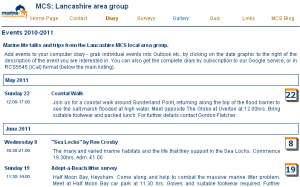
MCS diary screen-shotWe’ve just updated the MCS Lancashire diary to output events in iCal format, so that visitors can save event details to their personal electronic diaries. The new version allows visitors to download individual events in iCal format, or the entire current diary. There appears to be a problem with Outlook v6, however, that means it only imports the first event in the complete download…

We also created a public Google diary based on the iCal output, I guess it opens the question of whether or not it might have been better to have simply output this to the site (but then the Google calendar isn’t very pretty…)

MCS Lancashire’s new diary

The cookie crumbles (UK and EU websites)

EC cookieNew EU legislation is to regulate the use of cookies online. Cookies are ubiquitous, but on most sites the use of cookies is quite innocuous, commonly they are used:

  1. To track logged-on members, the cookie identifies your visitor and confirms that they have logged in, and are entitled to view a given page.
  2. To remember what visitors have looked at – allowing the site to maintain a back history (this might be ‘previously you viewed the following items’, keeping track of a shopping basket, or smart behaviour, such as only showing the introduction to a movie or animated display once).
  3. To track what users did on your site, possibly passing this information on to a third party. Whilst the information is ‘anonymous’ – the visitor is usually only identified by their IP address* – with enough linked sites a commercially useful profile of your visitors can be built up.

At CookandKaye we don’t use option 3 above, which is the one that is causing legal concern, unfortunately options 1 and 2 will also be caught by the proposed legislation. As a consequence, you may need to look at your existing web provision. Whilst prosecution is not imminent for any site, we recommend the following policies to cover this possibility:

With login forms: We recommend a comment to be added below the login form, to the effect:

To access this section of the site you must permit us to save a digital key on your computer called a cookie. This cookie will not be used to track your browsing history.

With shopping baskets: ICO says that if a cookie is essential to permit an activity, no consent need be obtained. In spite of this we recommend a comment to be added below the button to the effect:

To save an item to your shopping basket you must permit us to save a digital key on your computer called a cookie. This cookie will not be used to track your browsing history.

Clearly if you do use cookies to track browsing history (not everybody has the refinement to be a CookandKaye client!), the text in italics should be replaced with a statement to that effect! If you are able to add this text, however, then it provides you with an opportunity to re-assure your visitor.

With smart sites: Here the problem is a lot more difficult to solve satisfactorily, as the objective is to help the site run smoothly, not pop up warnings that it is about to save cookies on your browser. Unfortunately these just look like you are trying to do something dodgy, and are likely to damage your relationship with the visitor, rather than match your intent of offering them a tailored service. ICO has not yet published its guidelines, so for the moment we suggest placing a note in your footers to the effect:

Cookies are used on this site to help personalise the browsing experience for you. No information about your browsing history is taken from them.

If you do acquire browsing history, you need to seek legal advice here!

If this proves inadequate in the light of ICO’s final recommendations, then you will need more extensive work on your site. Our work-around at present is to track visitor’s IP addresses rather than use cookies – where this is permitted by your host. When a visitor requests a web page, the page is sent to their IP address, so a record of this is essential. In consequence it is difficult to imagine a reasonable legal challenge to holding this record. It also has the advantage of working whether or not visitors enable cookies! Unfortunately it is more difficult to implement, and there is a small possibility of mis-matching IP addresses and visitors because IP addresses are re-used. As a consequence the time window for tracking is quite narrow – of the order of a few minutes. This is good enough to follow a visitor from one page click to the next, but not safe enough to hold shopping cart information!

We don’t think there is anyone in the web-design industry who supports the new legislation, which, paradoxically, may oblige us to capture more detailed traces of IP addresses, if not actually save cookies on visitors’ computers. In the UK there is some reluctance to introduce the legislation, and a sizeable breathing space is being allowed for us to get ourselves organised to meet its requirements. Unfortunately we have to live with it, and we need to start living with it now. If you need help implementing any of these guidelines on your site please contact us.

More information is available through the BBC – see article linked below:

Websites told to ensure cookies comply with UK law (includes a link to ICO’s current guidelines).

* More clearly private data – linking the IP address/browsing history to a person’s name or physical address, which you might be able to do after your visitor has logged in, is already restricted under the data protection act – there is a good review of this on the BCS website:

Data Protection Act 1998 overview

Cookie crumbs: Update August 2011