scientific and technical website design projects news

CookandKaye News

Portable GIS icon design

Design options for the new Portable GIS logo

Rugged and extremely portable – how do you represent the world on a USB stick? The option finally chosen was based on that top left, and is used as an icon in the loader and system tray.

More about Portable GIS (download your free copy!):

Portable GIS v3 The Geographical Information System on a USB stick

Icon design for Lochaline Dive Centre

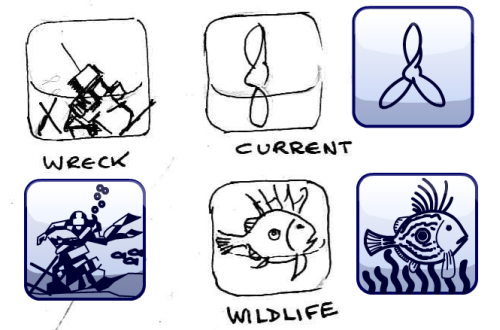
Dive icon designs

Above – three from a set of twenty icons indicating types of dive site for Lochaline Dive Centre. The image shows the initial sketches, used to check concept art with the client, and the final icon. The final icons reflect the site colour scheme, and the the wreck dive icon is based closely upon the Dive Centre logo to reinforce brand image.

New dive site pages being prepared to extend the current single page description of sites in the Sound of Mull (linked below) – which will become the diving home page with map and links to all sites. The plan is that visitors will be able to click icons to visit all sites of that type, simplifying the job of planning a sequence of dives.

The client will be able to select the appropriate icons from the WordPress control panel, and add a map position for the dive site, making it very easy to add and update sites.

Diving the Sound of Mull / Lochaline Dive Centre

Saddle and Spurs website

Saddle and Spurs line dancing club logo

This site is based on a simplified WordPress 2011 template, to make it as easy as possible to manage. The template options have been reduced to single posts and pages, a blog view and an all-important photo gallery. The gallery is one of the strong points of the WordPress CMS – allowing the user to simply drag and drop photographs from their desktop into the post, WordPress does all of the donkey work of creating thumbnails and laying them out in the page.

The site features reactive design – permitting the page to scale between 300px and 1000px in width, with layout changes for narrower browser windows (narrow windows are usual for mobile devices, but if you have a desktop browser you can simply drag the window to re-size it and see how the layout changes). This feature is pretty much straight out of the WordPress template, keeping development costs down to a minimum, but still giving a nice, clean site that works across a range of platforms. As a nice addition, we’ve added two background graphics – in portrait and landscape formats – so that narrower windows have a more appropriately sized background image.

CSS3.2 Improved display on wide screens and mobile devices

This post follows on from “CSS3.1: The final depiction of the cards“.

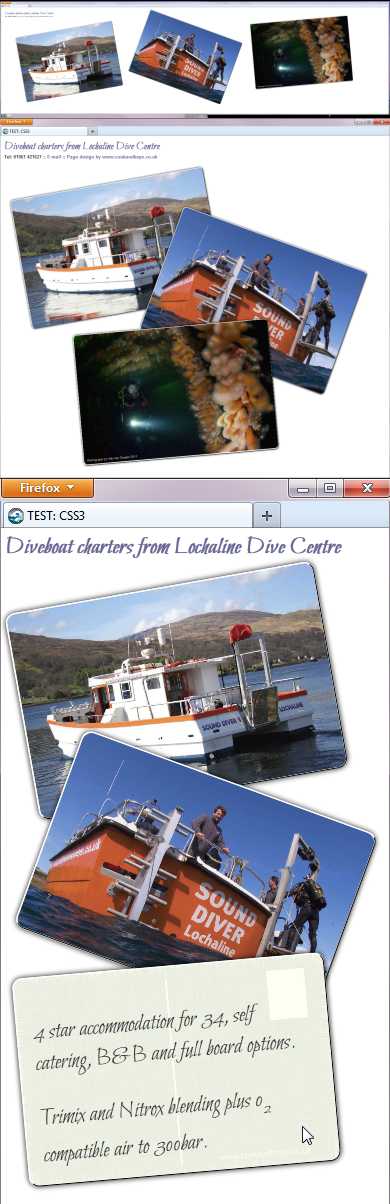
Screen shots on displays from 3600px to 300px in width for the lochaline Dive Charters site.

Here we have adapted the styling to give an effective display on devices with widths between 300px (equivalent to a small mobile platform) to 3600px – a massive HD movie screen…

In this we are really dealing with two problems simultaneously – the screen resolution, which puts a limit on how small text and images can go before they are degraded beyond use, and the range of aspect ratios, which dictate how we lay the page out to make best use of the available screen real estate.

In the first instance we are treating this traditionally as a resolution problem, to be treated by evaluating the width of the display window in pixels, and reordering our offering accordingly. In as much as there is one, this appears to be the standard approach in the web0-design industry at the moment, and in our third iteration here, we will stick to this. In reality, however, the aspect ratio is the real issue with determining layout, and we’ll look at this again at the end of this instalment.

With very wide screens there is a problem with ‘letter boxing’; designed to display movies, the height of the screen is very much smaller than the width. For this type of display we have laid the cards out next to each other (top right – note that in reality this is the LARGEST of the three displays), and permit them to scale up to their full size of 900x600px. We tested this with an extreme case – actually using a twin head monitor system with an effective resolution of 3600x1080px, or an approximate aspect ratio of 3.5:1.

With most desktop and tablet screens the aspect ratio of the screen is about 1.5:1 – we want some spread in both width and height of the card distribution to make effective use of the space.

For narrow mobile devices we need to keep the text on the reverse of the cards legible, so the cards cannot be too small. To maximise the size of the cards in a narrow page, therefore, we stack them, as shown bottom right at near actual size. The bottom screen shot has a mouse cursor over the last card, showing that the text on the ‘reverse’ is quite readable.

Where it works

Screenshots of the design at different browser window widths are shown above right, at the top is the layout for windows greater than 1200px in width, then browsers between 1200px and 600px, and finally at the bottom is that for browsers between 600px and 300px in width.

If you view this site on a desktop browser (link below), you can have a bit of fun re-sizing your browser window* to see how the design adapts to changes in width. What you should see is a smooth change in scale of the postcards as change the width of the window. Periodically the layout will change, switching to make best use of the guessed aspect ratio.

* – Remember we are making no concessions to older browsers in this micro-site. If you are unlucky enough to be using an older browsers the postcards will have right angled corners and sit square on the page, and you’ll be stuck with just one layout (for the widest screen size).

Where it doesn’t work

To build a properly future-proofed responsive design we’ll need to tackle the display aspect ratio, rather than just guessing at this based on the width of the display window. At the moment what we do is adequate, but it only works because displays are pretty predictable. Displays where 1.5:1 aspect ratio’s equates to 3000 by 1500px are pretty few and far between BUT on one of these we’d end up with an inadequate looking page with all of our cards in a line along the top with a lot of white space below them…

For the moment this is unlikely, but the new ‘retina displays’ and similar technologies with very high pixel densities may prove to be game changers. A very high pixel density could result in the site switching to a wide screen layout, resulting in tiny, illegible cards as a border along the top of the browser window, and that will not win friends.

The new CSS3 recommendation, however, is equipped to permit us to ask about aspect ratios, so we’ll take a look at that next, to see if we can avoid the problem, and how well current browsers do this…

Articles in this series:

  1. Working with CSS3: the shape of the web to come the dive boat charter micro-site concept and sketch layout
  2. CSS3.1: The final depiction of the cards showing the basic layout of the cards. The layout here copes with displays between 300px and 1200px wide. Wider displays leave the site stranded in the centre of the page see: CSS3.1 : Dive boat charters test site v1
  3. THIS ARTICLE CSS3.2 Improved display on wide screens and mobile devices working with very wide displays using industry standard techniques, and looking at how we might future proof the design

CSS3.1: The final depiction of the cards

This post follows on from “Working with CSS3: the shape of the web to come“.
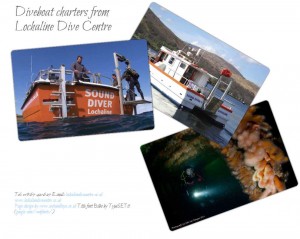
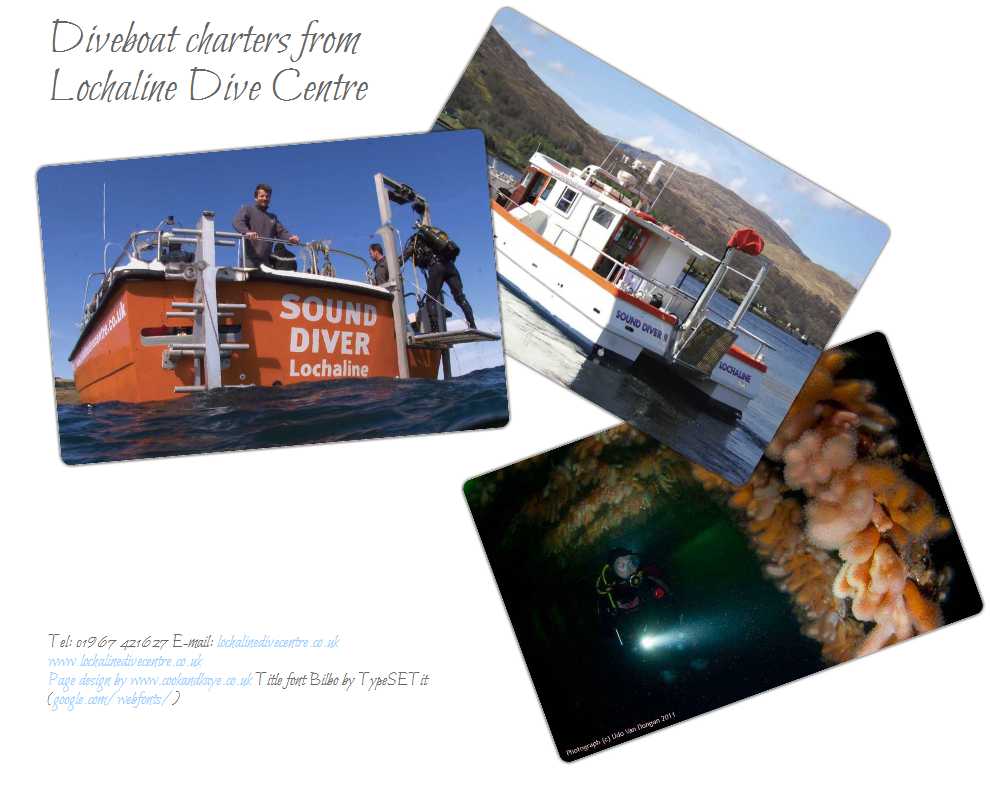
CSS3 test site screenshot - version 1.

Whilst it is the final state of the postcard scatter, it is the first stage of realising the overall design. Here we aim for a static layout matching the our original design sketch. There is no animation leading to the final design, and the layout is static, though the images are set at a high enough resolution to allow us to scale to larger displays later.

This stage is the most important for the micro-site, as it is the one that gets our message over to visitors. To achieve these aims we used the following CSS3 markup:

transform: rotation(); This permits us to place our rectangular cards at different angles. This syntax used with prefixes (-webkit- -ms- -moz- etc.) worked reproducibly all current browsers

border-radius: ; Giving the postcards rounded corners – not strictly essential to the effect we were looking for, but throws up some interesting exceptions. The radius applied to a parent div is not automatically applied to children in all browsers – in this instance we have a .postcard, which defines the block where the postcard content lives, and has a drop shadow (box-shadow) applied to it. Within this is the actual photograph (img). In Firefox this also has the border radius applied, in Chrome you have to apply the border-radius again to the img, even though it is a child element.

box-shadow: ; This allows us to have elements drop a shadow behind them, all browsers work will even though a border radius is applied to the postcards. If the shadow is offset, so the shadow appears to the bottom right of the object casting it, to give the impression of a casting light above and to the left of the object, the shadow painted is a solid block of colour. As we have underlying postcard(s), this is quite unsightly. There is no option for making the shadow transparent in CSS3 (it does not appear to be possible to specify colour as ‘rgba ‘etc.). To get round this the shadows are given zero width, but 5px feathering – which is semi transparent, and gives us an acceptable appearance for the end-state of the images.

Interaction using the :hover and :active states

The interaction needs to be really intuitive – none of our text is visible to the visitor when they arrive, and we are reliant on the appearance to suggest that more is available: When you receive a postcard you expect a message on the back, but online you can’t physically flip the cards over…

To get a simple and immediate interaction we use the :hover and :active states that were originally designed for web-links (anchors) – when you hover your mouse over a web-link it (usually) changes colour or form to indicate that there is a link present (and not just some underlined or funny-coloured text). A similar ‘active’ state indicates that you have clicked the link, and the browser is trying to find the resource you’ve asked for (strictly the W3C standard for CSS2 states that the active state persists from the time that you click on an element to the time that you release the mouse button).

Whilst usually used for anchors, it has been possible to use :hover and :active states for all elements (not just links or anchors) for a number of years, but implementation is still a bit variable across browsers. Our first attempt, setting the hover states to bring postcards to the top of the pile by changin their z-index worked well in all browsers. Using the :active state to ‘reverse’ the card worked as expected only in Firefox, however – see the analysis below…

Font choice

While not strictly CSS3, recent developments have made a large number of fonts widely available for free use on the web. Here we’ve used the font ‘Bilbo’ by TypeSETit (available through google.com/webfonts/). This is a pretty good script font that does not look out-of-place on the back of a postcard – if you were to take time to make your postcard legible!

Fonts do make downloads a little slower, and you may spot a flicker in the font when you load the page, moving from your standard cursive font face to Bilbo, particularly if you are on a slow internet connection.

Micro-site analysis

Bear in mind that we are not doing anything to make this micro-site compatible with older browsers, you can see our initial site at lochalinediveboats.co.uk/bak01.html (this URL will be updated as improved versions of the micro-site are completed), and as a very much reduced scale screen-shot above right.

  • The layout for our first attempt works fine in all current browsers.
  • All browsers bring cards to the front when your mouse (or finger) hovers over them
  • Only Firefox (v.13.0.1) displays the reverse side for the card using the simple anchor active: selector.
  • The active state in Chrome (20.0.1132.57 m) shows the reverse side of the card the first time the active state is called, but not subsequently – unless you right click then left click…
  • IE9, Safari (5.1.7), Opera (12) and Webkit browsers do not show the active state at all

The problem we have encountered here is with CSS2, not CSS3. My reading of the W3C guidelines indicate that the active state is being correctly implemented in Firefox, but not the other browsers. With touch screen browsers, however, it is not entirely clear how the active state would be initiated as there is no activating mouse button on your finger, so clearly this aspect of our design will need to be re-thought…

Update 26th July 2012: Clearly we needed to change so that the card ‘reversed’ in the hover state, rather than the active state, and this, with a little tidying of the CSS now works in all current browsers (including on mobile devices), giving us our starting point for the rest of the development.

Articles in this series:

  1. Working with CSS3: the shape of the web to come the dive boat charter micro-site concept and sketch layout
  2. THIS ARTICLE CSS3.1: The final depiction of the cards showing the basic layout of the cards. The layout here copes with displays between 300px and 1200px wide. Wider displays leave the site stranded in the centre of the page see: CSS3.1 : Dive boat charters test site v1
  3. CSS3.2 Improved display on wide screens and mobile devices working with very wide displays using industry standard techniques, and looking at how we might future proof the design

Art attack – a tsunami in Morecambe Bay

A tsunami in Morecambe Bay...

Recently we set up Twitter and Facebook accounts for the local Marine Conservation Society (Lancashire MCS), and as part of this process we wanted some graphics for page backgrounds. My immediate design idea was to create line art of rolling waves that would tile seamlessly across the page. The best line art waves that I am familiar with come from Japanese art – so a little web hunt was in order to get some background, and see how the masters had tackled the subject.

The image that I dimly remembered was by Hokusai, from a print called the ‘Great Wave off Kanagawa’ (see Hokusai’s Wikipedia entry for more background, and a reproduction of the original print). This is really quite a masterful depiction of a breaking wave, and just a little research will show that it has been reproduced and changed countless times by different people.

As the first stage of creating the tiling background I worked very closely with the original in Flash, my preferred vector art package, to create the image shown above. The form of the wave has been retained, with simplification of the foam, which I feel is only partially successful. The main changes are to the sky – using diagonal hatching to suggest rain. I also removed the reference to mount Fuji, and while a view of the Lake District hills might have been nice, it would have been an interesting tiling problem!

During the development, however, we switched direction with the art-work, and went for a simple underwater photograph – so the line-art became redundant. As the image is rather nice, however, I worked up the concept as the simple circular icon shown (click for larger version).

If you are interested the social network pages are:

facebook.com/MCSLancs

twitter.com/mcslancs

Working with CSS3: the shape of the web to come

The new features available in CSS3 are increasingly important to web designers. A number of our sites now offer flexible templates, that change the layout of a page for hand-held devices, improved background control properties to paste an image over the entire device screen; elsewhere on the web drop-shadows and embossed text are now very popular…

Our new micro-site for Lochaline Dive Centre, however, offers us the opportunity to be a bit more relaxed about the way we approach CSS3. A pure advertising site, this is aimed at casual visitors, rather than committed customers, to increase the profile of the dive charter boat service available from the Centre. If the site falls over for a few visitors, it is no big deal, we are looking to make an impression on people using up-to-date tech… So what eye-candy can we throw at them, and what lessons do we learn about CSS3 in the process of creating the site?

Planning our CSS3 test site

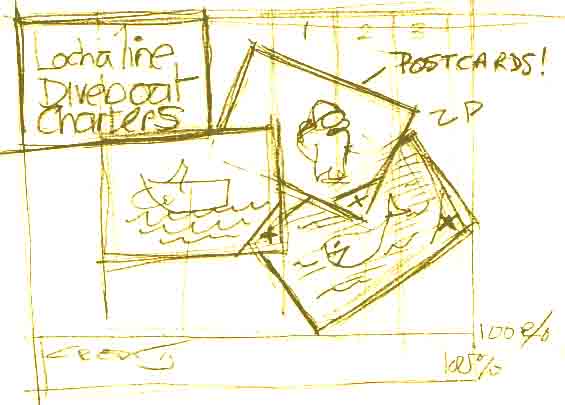
CSS3 site concept sketch

Design concept: A set of postcards, featuring the dive boat charter services offered by Lochaline Dive Centre, scattered onto the browser window.

Interaction: Visitors must be able to intuitively interact with each image – bringing any card to the front to view the image, and reverse the card to read the message on the reverse.

Universal media: The layout and scale of the cards should change to reflect the size of the browser ‘stage’ available to the web-page.

Animation: When the page loads the postcards should be off-screen. They should then float into the browser window, as though dealt one by one onto the screen.

The question is, how much of this can we do with the new CSS3 markup, and how much will we have to look to the programming layer (Javascript) to achieve the effect we want?

The project is being built in a number of iterations, so there is some interest in seeing how many of these targets we can hit just using CSS3, and how many compromises we are obliged to make in our original design concept…

Anecdote: The original design (above) is on paper, which I still find to be the fastest way of laying out an idea. In annotating it for this post, I made a mistake (looks like ‘ZP’) – my immediate reaction was to look for CTRL-Z to undo this. Our expectations from a digital world encroach on ‘the real’.

CSS3.1 – the next post with the layout of the post cards

If you are interested in diving some of the great wreck sites in the Sound of Mull, you can check out Lochaline Dive Centre’s main website at:

Lochaline Dive Centre – dive boat charters

Articles in this series:

  1. THIS ARTICLE Working with CSS3: the shape of the web to come the dive boat charter micro-site concept and sketch layout
  2. CSS3.1: The final depiction of the cards showing the basic layout of the cards. The layout here copes with displays between 300px and 1200px wide. Wider displays leave the site stranded in the centre of the page see: CSS3.1 : Dive boat charters test site v1
  3. CSS3.2 Improved display on wide screens and mobile devices working with very wide displays using industry standard techniques, and looking at how we might future proof the design

Latest: WordPress 3.4

WordPress logo

WordPress has just released a new version, the major changes (and there are a lot!) are to theme customization, and we will be building these into new themes for our clients from now on!

The update is quite significant, but does not appear to address any security issues, so it is not critical to operation. We have tested the update on two sites today (including this one), and it has run without problems. We will watch out for any security patches over the next few days, then update existing clients sites as a matter of course.

More details about the release are available directly through WordPress:

WordPress 3.4 “Green”

UK Semiconductors 2012

UK Semiconductors conference 2012
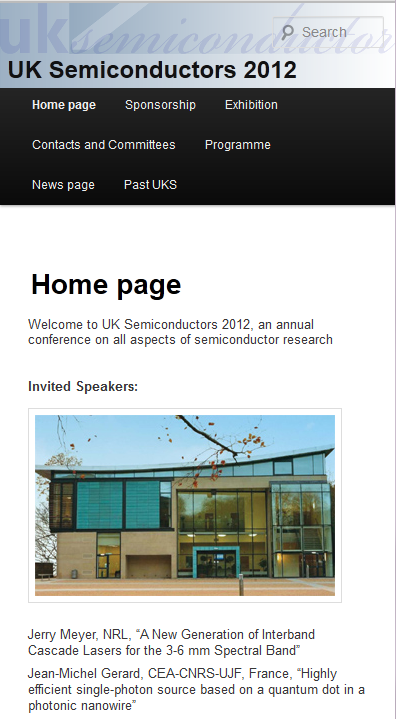
Our latest site is for UK Semiconductors 2012, an annual conference on all aspects of semiconductor research.

The brief for UK Semiconductors was for a site that would be flexible, but easy to manage. Both requirements are met by the WordPress Content Management System (CMS).

Ease of use: There are a lot of very powerful CMS systems available, but most have a steep learning curve. This is a serious problem for a conference site, where you are only actively editing the site for part of each year – you don’t want to spend a lot of time trying to remember how things work! WordPress’ simple visual editing system permits live WYSIWYG editing of existing pages, the excellent news management system is totally intuitive (simply stacking new news items on top of older ones!); finally, the simple visual menu builder (drag and drop new pages to where you want them in the menu) is child’s play…

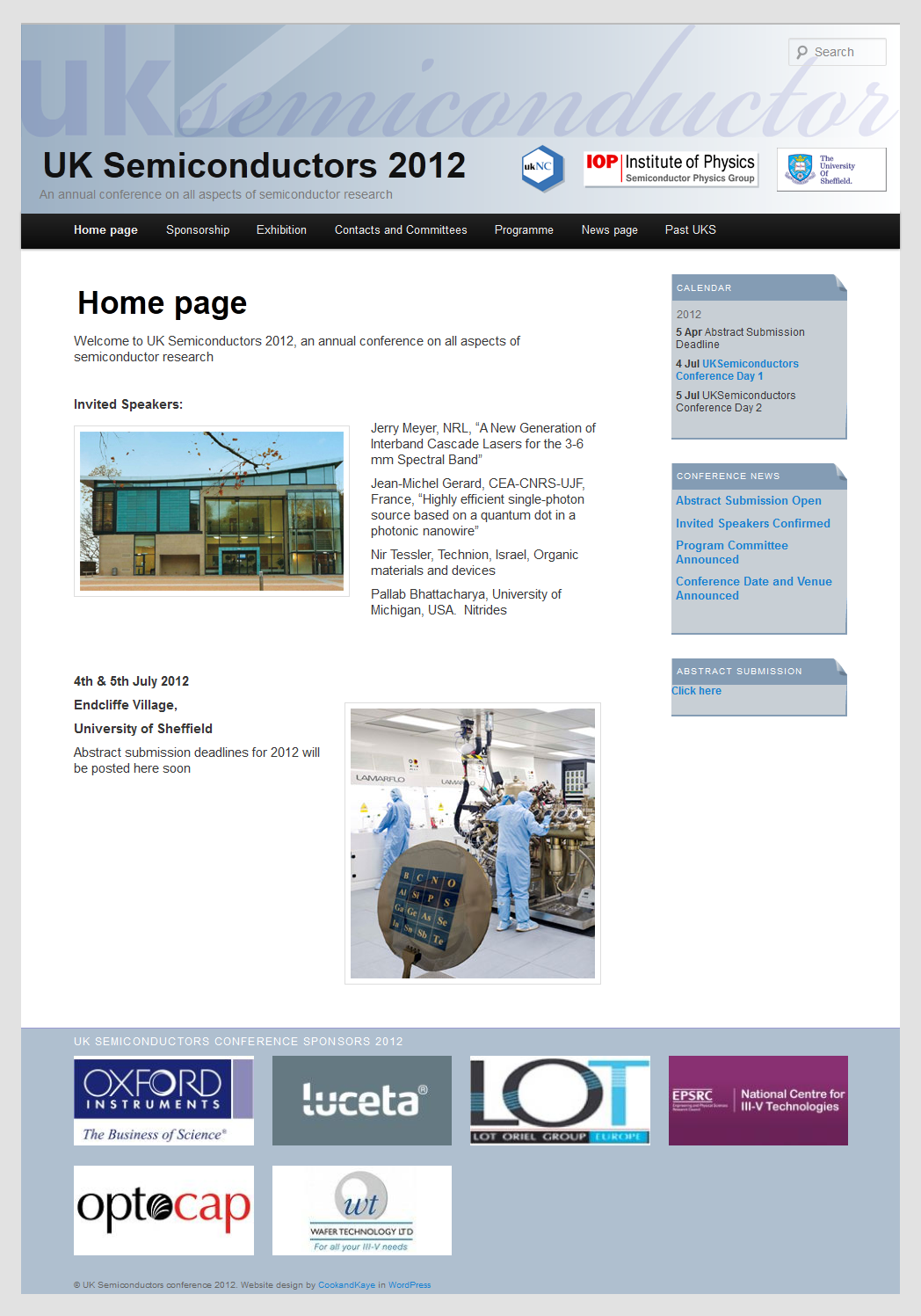
Above right: UK Semiconductors website on a full width display, showing sponsors’ logos along the foot of the page (click for full size image).

UK Semiconductors website on a narrow device display
Speed and flexibility: For an annual conference there is a need to be able to switch much of the furniture from one year to the next – adapting the 2011 templates permitted us to offer the flexibility to upload a new banner (or offer a random banner from a selection, your choice!). Whilst adapting a standard template offered less scope for innovative design, it also really speeds up the development process, enabling us to get from kick-off meeting to completed site in a week…

Device flexibility: It is valuable for a conference site to be flexible – you want delegates to be able to check out what is going on during the conference, be able to check the program on their smart phones during the event. UK Semiconductors re-organises its page structure to permit visitors to view the site without scaling or lateral scrolling on devices with displays that are only 400px wide.

Right: UK Semiconductors website on a 400px wide display. The banner has re-sized to fit the new width, and the calendar and news items now appear below the main article, so all elements of the page can be read easily without scrolling (or squinting!)

Additional functionality: To complete the site, we also added a couple of custom plugins. These allow the conference organiser to add a gallery of sponsor’s logos below each page of the site, and to add a simple calendar of events, so delegates have a quick reminder of what is coming up on each page of the site. (WordPress is easy to build for, if what you need is not available from a massive public library of free and commercial plugins, so there is no need to compromise!).

Visit: UK Semiconductors 2012 for more details about the conference, or to see the site in action.

SMARTdiving

SMARTdiving icon

SMARTdiving conducted a feasibility study into sinking a decommissioned Royal Navy Frigate in the Sound of Mull. This was a really exciting project, partially because it raised a lot of issues, wqith a range of different stake-holders, which were covered on the project website.

The site itself was a variation on the current WordPress standard template – ‘twentyeleven’, which features a lot of really nice tricks straight out of the box. It was chosen to allow the client to use all of the features of WordPress to take on board comments and post progress reports. This will be an important part of the project as keeping divers and the local community informed and on side is vital to the project’s success.

Above right: We designed the icon (shown above right) and the banner for SMARTdiving site.

One of the interesting challenges has been to keep the twentyeleven flexible templates working through the design changes. The new templates are all HTML5, and make use of this to offer offer is mobile support, so the site automatically ‘appifies’ to display on iPods, Androids and RIM machines (other devices are available – the system relies on the device screen width, rather than being specific to any operating system). Being an old hand it is easy to forget and insert template images with fixed widths (previously best practice), w/o catching them in percentages in the stylesheet, that will allow them to shrink in proportion to the rest of the site when it is displayed on a small screen…

Anyway, the hope and expectation is that the new artificial reef will contribute an interesting and exciting new site for divers, and so bring additional employment to this part of the West Coast of Scotland. Having previously studied some of the existing sites in the Sound, I was particularly interested in how the site would have been colonised by marine life, and how this process influences the deterioration of the structure.

If successful, the project would have increased tourism to the area, as well as providing  a fascinating modern comparison to the existing wreck sites in the Sound.